

See it in action
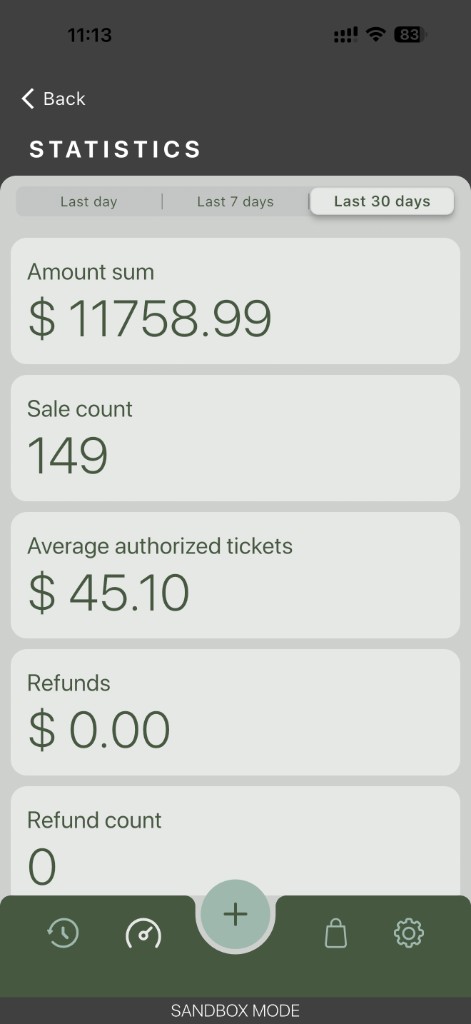
Swipe through real Processa screens — statistics, the management hub, every checkout flow, payment methods, customer vault, and tip selection. The same flows look identical on a tablet, so what your merchants see here is what their staff use behind the counter and out in the field.
One app for the counter, the curb, and everything in between
Processa is a real point-of-sale — not a stripped-down companion app. Merchants sign in with the credentials they already use in the Control Panel, and every phone or tablet instantly becomes another lane. Same carts, same payment methods, same receipts, same reporting. One product to sell, one product to support, zero parallel configuration.
Where it pays off
- Pop-ups and farmers markets where a full terminal footprint isn’t practical
- Delivery routes and service calls where payment is collected at the door or on the job
- Line-busting and overflow lanes during peak hours
- Anywhere staff already carry a phone or tablet and want the same checkout tools they have inside the store
A real point-of-sale your merchants can take anywhere
Sell one product, support one product, and let the same Control Panel rules drive checkout on every counter, phone, and tablet — no parallel onboarding, no second admin tool, no surprises for staff.
Fast for the front line
One-tap sign-in, a home screen of shortcuts, and a three-tab checkout staff already understand. Cashiers ring sales — they don’t learn software.
Powerful for the back office
Per-method payment controls, custom fields, signature rules, tax defaults, and tip presets — every switch lives on the device, with no admin app to ship.
Familiar for your merchants
Processa mirrors the Control Panel you already configure. The methods you enabled, the fields you required, the receipts you set — they all show up automatically.
Sign in fast. Stay secure.
Processa auto-advances to the login screen and meets each merchant where they are — from biometric tap to corporate-grade PIN.
- Username and password with a built-in show/hide eye on the password field
- 6-digit PIN sign-in with a numeric dial-pad and six progress dots — and on iOS, one-time codes from Messages autofill the PIN in a single tap
- Face ID, Touch ID, or passcode on supported devices, controlled from Settings → Authentication, with a dedicated Change Passcode flow
- Sandbox mode available right from the welcome screen for testing — no separate build to ship to QA
- Inline error handling — bad credentials surface a clear red message above the fields instead of an extra screen to dismiss
- One-tap logout at the bottom of Settings returns staff straight to the login screen
Looks great. Feels native. Stays out of the way.
- Built for dark mode — every screen is designed for both dark and light themes, with dark on by default and a one-tap toggle in Settings → Style
- 5-tab bottom navigation across the whole app: History, Reports / Lists, a centered New Transaction button, Cart / Basket (which turns green when active), and Settings
- iOS-style back navigation on every drill-down screen and the native iOS status bar (time, signal, Wi-Fi, battery) visible throughout — Processa feels like part of the device, not a wrapped web page
A home screen that does today’s work
The first screen after sign-in is built for one-handed use and the most common tasks of the day — no menu hunting required.
- Add customer and Add item as the two big quick-action tiles
- Full-width monthly total widget so the running revenue number is always at a glance
- Recent transactions feed grouped by Today and Yesterday, with time, brand logo, card last-4, amount, and a green checkmark for every successful sale
- Visa, Mastercard, and other brand logos render inline so staff scan the feed without tapping in


A checkout staff already understand
Three tabs across the top — that’s it. Whichever way the merchant runs the front of house, Processa is one tap from the right view.
- Key — type a custom amount when Manual Amount Entry is on
- Items — pick from the catalog, add a tip or discount, build the sale
- Cart — line-by-line view with quantity controls; the basket icon glows green in the bottom bar so staff always know where they are
- Tips and discounts add or remove from the Items tab or the cart — same flow, two entry points
- Receipts by email, text message, or print (one or two copies) — plus a Send receipt toggle right on the payment step
Every payment method, one screen
Processa accepts the way your merchants already get paid — and lets them turn each method on or off without touching the Control Panel.
- Card (keyed or external reader) with configurable input type, billing fields, custom fields, and signature rules
- Customer Vault — search saved profiles and charge a card or ACH on file
- ACH with Account Number, Routing Number, Account Type, and SEC Code
- Terminal for physical card readers, with its own page-order and field configuration
- Cash, off by default and one toggle away from on
- Every method has independent Available, Page Order, billing/custom field, and signature controls — so each merchant’s checkout looks like their business


Customer Vault, in their pocket
The full vault travels with the merchant. Look up a customer, charge a card on file, or update a billing address from the phone — without ever opening a laptop.
- Searchable, filterable customer list with name and primary payment method (masked card or ACH) right on each row
- Add customer from the header, the home screen, or the Management hub
- New Card (number + MM/YY) and New ACH (account, routing, type, SEC code) flows
- Edit Card and Edit ACH with masked display, Set as Default Payment Method, and one-tap Update Payment
- Confirmation modal before deleting a payment method — never a slip of the thumb
- Edit Address with all fields pre-filled, trash-can delete, and Set as Default Billing / Set as Default Shipping in two tidy buttons
Catalog, discounts, and tips — all on device
Build out what you sell — and the adjustments that ride with it — without leaving the app.
- Items with thumbnail, name, and price; new and edit forms include price toggle, fixed-quantity toggle, category, two national tax fields, description, and image upload or URL
- Discounts and Tips with simple name + amount rows and a + shortcut in each header
- Friendly safeguards: every delete asks for confirmation (“cannot be undone”) and missing fields trigger a clear inline alert before save

Real-time numbers, between transactions
The questions a manager asks between sales — answered without opening another tool.
- One-tap segmented control for Last Day, Last 7 Days, and Last 30 Days
- Amount sum, sale count, and average authorized ticket for the period
- Refunds, refund count, and void count alongside revenue, so corrections never get hidden
Cart that closes the sale
Two of the highest-leverage moments in any transaction — confirming the cart and asking for a tip — are designed to keep the customer’s eye on the running total.
- Live cart with quantity controls and instant recalculation
- Tip selection screen the merchant can show or hide in Settings
- Favorite Tip Amounts (e.g. $10, $20, $50) appear as one-tap presets so customers don’t have to think

Find any sale. Fix any sale. Right from the device.
Processa keeps the full transaction history on the phone — and the detail screen carries everything a manager needs to support, refund, or follow up without switching to the Control Panel.
Search and filter on the spot
- Search bar with results that update as you type — when a query is active, the list collapses to Search Results only
- Advanced filter / sliders icon next to the search field for deeper queries
- Date-grouped sections (Today, Yesterday, …) — every row shows status, time, brand logo, last-4, and amount
Every transaction, in full
- Header card with copyable transaction ID, date and time, brand, last-4, amount, and an Approved status badge
- Itemised line items with individual prices (e.g. Flat White $4.50, Doppio $3.50)
- General metadata: ID, type, response, response code, source, payment method, username, PO number, order ID, settlement batch ID, and created / updated / settled timestamps
- Amount breakdown: Amount, Authorized, Captured, Settled, and Tax Exempt status
- Processor section: type, ID, and name
- Dedicated billing and shipping address blocks
- Void and Email receipt live on the same screen — no menu hunting
Set it once. Use it everywhere.
Settings is organised so the most-changed switches are at the top and the deep payment-flow controls live one tap deeper. Everything is on-device — no separate admin tool, no second login.
General
- Devices — paired IDTECH card readers (e.g. IDTECH – VP350-94209) with a Connected status
- Payment Method — full per-method configuration (see below)
- Tax — global defaults for National Tax rate (e.g. 5.5%) and Local Tax rate (e.g. 4.3%)
- Authentication — Face ID toggle, Passcode toggle, and a Change Passcode row
Style and support
- Dark mode toggle (on by default) and a Homescreen layout customiser
- Helpdesk and Documentation links built into the app
- Tooltips, Debug Mode, and a static Version row (e.g. V2.6.0)
- Privacy Policy and a clear, destructive Logout at the bottom
Per-method payment controls
Each method exposes the same building blocks, so merchants choose exactly which steps a cashier sees.
- Card: Available, Page Order, Input Type (e.g. Scan), Billing fields, Other fields (PO Number, Order ID), Custom Fields, Signature (e.g. Always)
- Terminal: Available plus Page Order, Amounts, Billing, Other, Custom, Signature
- Customer Vault: Available plus Page Order, Amounts, Other, Custom (no Billing or Signature)
- ACH: Available plus Page Order, Amounts, Billing, Other, Custom
- Cash: Available toggle (off by default)
Checkout, tips, and legal
- Manual Amount Entry for typed totals at checkout
- Item Selector for catalog-driven sales
- Tip Amounts Screen on or off, with Favorite Tip Amounts preset values
- The full Fluid Pay LLC privacy policy is rendered as scrollable text inside the app — no external browser, nothing for the cashier to dismiss mid-shift
Card-present payments, on the device the merchant already owns
For chip, contactless tap, and magnetic swipe on a phone or tablet, pair Processa with the IDTech VP3350. We recommend USB-C for the most reliable connection; Bluetooth is available when wired isn’t practical. Card data is encrypted at the read head with DUKPT key management before it touches the device — the same security model described on our EMV & mobile contactless page.
Get your merchants on Processa this week
Four steps from “interesting” to live transactions. No parallel onboarding, no separate boarding step, no admin app to ship.
-
1
Install From the App Store or Google Play (badges at the top of this page).
-
2
Sign in With existing merchant credentials — no parallel setup, no second login.
-
3
Bundle the VP3350 Wherever merchants need true mobile card-present acceptance.
-
4
Lean on the Control Panel You already configure it for them — Processa picks it up automatically.
Roadmap items such as split payments, remote payment links, and richer scheduled reporting are in flight — let us know which would move the needle for your portfolio and we’ll keep you posted as they ship.